News
Touch Matching: how to play, modes and tips
A calm connect-pairs puzzle for the web, iPhone, iPad, Mac and Android. How the path rule works, which mode to choose, and how to clear boards faster.
Touch Matching is a connect-pairs puzzle in the Onet / Shisen-sho family: find two identical picture tiles and link them. It is free to play in your browser and is also on the App Store, the Mac App Store and Google Play (buttons below).
The one rule to learn
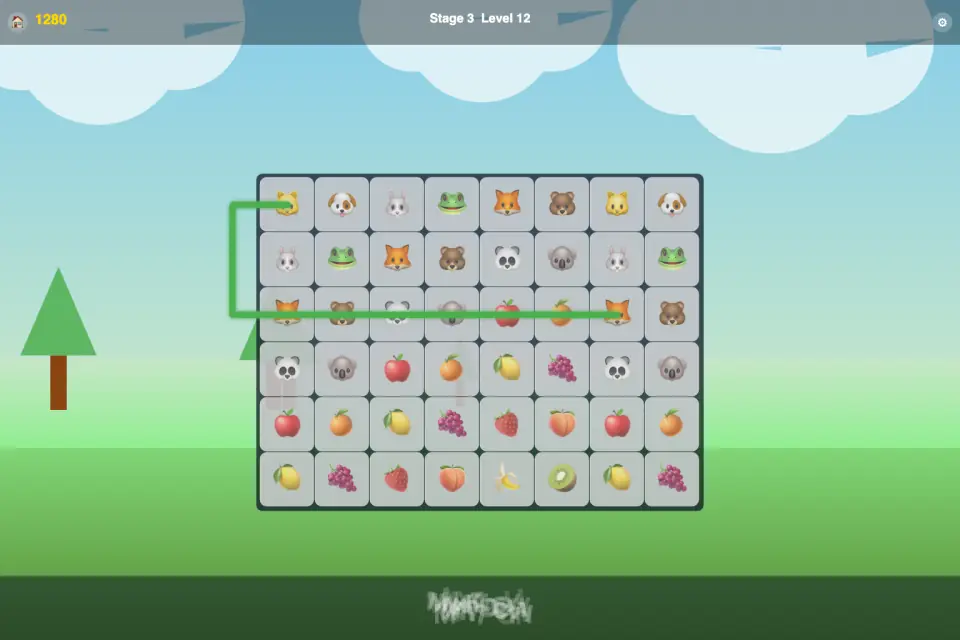
Tap a tile, then tap its twin. The pair disappears if the two can be joined by a path of up to three straight lines — horizontal or vertical, with at most two turns — that runs only through empty space. Other tiles block the path, so the order in which you clear pairs matters: every pair you remove opens new corridors for the next one.
If no legal move is left, the board reshuffles by itself, so you are never stuck.
Three modes
- Basic Rules — the classic path rule, with up to three stars for finishing quickly.
- Kids Mode — tap two identical pictures, no path checking. An easy start for young children and first-time players.
- Timed — the classic rule against a countdown, with bonus points for speed.
Progress is saved separately for each mode, and you can switch in Settings at any time.
Worlds and levels
Levels are grouped into five worlds — Nature, Cuisine, Animals, Urban and Mystic — with 50 stages and more than 4,500 levels in all. Each stage has its own tiles and background, and the level map shows the board size, the number of pairs and the time limit before you start. Along the way you will meet bonus levels, boss levels and levels with hidden tiles. Finishing every level of a stage unlocks the next one.
Tips
- Work from the outside in. Pairs near the edges usually have the most room for a path, and clearing them opens long corridors into the middle.
- Trace the route before you tap. If it needs a third turn, first clear the pair that is blocking it.
- Matching quickly in a row builds combos, so a steady rhythm pays off in Basic and Timed modes.
- In Timed mode, don't stare at one stubborn pair: clear an easy one elsewhere and come back.
- With children, stay in Kids Mode until they know the pictures, then move on to Basic Rules.
Where to play
The Touch Matching page has screenshots and details, or you can play right now in your browser. The store buttons below always point to the stores where the game is live today. Web and store versions are updated at different times, so a new feature may reach one platform a little before the others.