Guide
Brick Zone: no gravity, one scanner, five sweeps
Brick Zone throws out the falling-block clock. Here is how manual placement, the yellow scanner and its area-squared scoring fit together.
Brick Zone takes the stacking puzzle and removes the thing everyone assumes it needs: pieces never fall on their own. There is no drop timer. You decide where every load goes — and a yellow scanner decides what your work was worth. Play it in your browser or on Android.
The loop
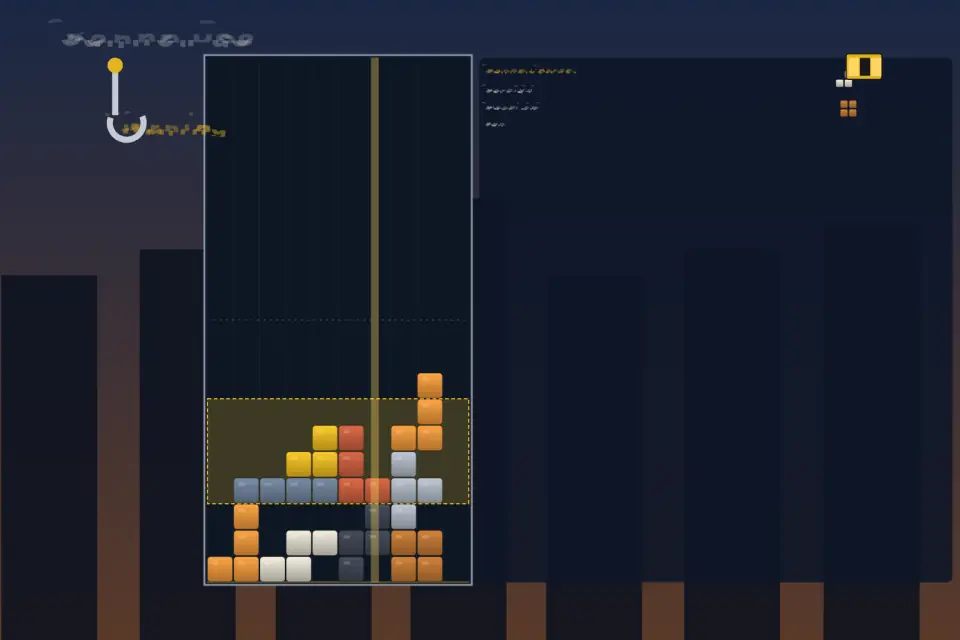
A crane feeds masonry loads onto a ten-column yard with no ceiling. Each load waits where you put it while you slide it, rotate it and check the ghost outline on the stack. When the fit is right, you commit it.
Every ten placed loads arm the scanner. A hazard-yellow frame has been drifting across the tower the whole time, marking the band it will cut. When the counter hits zero, the camera focuses on the frame, a beam runs through it and every brick inside breaks at once. What survives settles as solid loads, so the tower still looks like the one you planned.
Where the points come from
- Broken cells pay a flat rate.
- Full rows inside the frame pay more.
- The largest solid rectangle in the band pays on its area squared — a tight block is worth far more than the same number of scattered bricks.
- Clearing the whole frame is a Perfect Zone.
- A cycle multiplier climbs from 1.0 toward 1.8 during the shift, so the later sweeps count the most.
Every shift is exactly five sweeps and ends with a full result board showing where your score came from.
Three ways to work
- Scanner Contracts — thirty campaign stages with rising targets and a quicker scanner.
- Ranked Shift — the standard run, posted once to the Foreman Board.
- Daily Blueprint — a piece bag seeded by the day, so everyone works with the same materials.
Planning tips
- Watch where the frame is drifting and build your densest block where it will pass.
- Use the Hold Bay to park a load that would break a clean rectangle.
- Do not neglect early sweeps: with the multiplier rising, a messy tower is hard to rescue late.
- The three-load preview tells you what is coming — plan rectangles around it.
Touch: drag sideways, tap to rotate, swipe down or use the drop control to place. Keyboard: arrows move and place, Z and X rotate, Space commits, C or Shift holds, Escape pauses. More on the Brick Zone page, or start a shift.